![(please configure the [header_logo] section in trac.ini)](/ModelGlue.com/trac.cgi/chrome/site/your_project_logo.png)
| Version 2 (modified by boomfish, 16 years ago) |
|---|
Section 6: Flow and Dependencies
It would be nice if all application functionality were simple and we didn't have to contend with real world business requirements. In this next walk-through we are going to use Model-Glue to enforce some application logic dependencies. Take special care to notice the auto-documentation features of Model-Glue when used in this way.
In this next exercise, we'll be creating a form to create/update Shipment Items, and also a way to remove Shipment Items. As such, we'll need several Event Handlers, a few controllers and a new view file.
- Open /PlantOMatic/config/ModelGlue.xml, find <event-handlers> and insert the following XML:
<event-handler name="Item.Form" type="templatedPage">
  <broadcasts>
    <message name="require">
      <argument name="requiredVariable" value="ShipmentID" />
      <argument name="redirectIfNotProvided" value="Shipment.List" />
    </message>
    <message name="needPlantList" />
    <message name="needItemBean" />
  </broadcasts>
  <views>
    <include name="Primary" template="Form.Item.cfm">
      <value name="xe_HandleSubmitForm" value="doItem.Form" />
    </include>
  </views>
</event-handler>

<event-handler name="doItem.Form">
  <broadcasts>
    <message name="handleItemBean" />
  </broadcasts>
  <results>
    <result name="Failure" do="Item.Form" />
    <result name="Success" do="Shipment.Display" redirect="true" append="ShipmentID" />
  </results>
</event-handler>

<event-handler name="doItem.Remove">
  <broadcasts>
    <message name="require">
      <argument name="requiredVariable" value="ShipmentID" />
      <argument name="redirectIfNotProvided" value="Shipment.List" />
    </message>
    <message name="require">
      <argument name="requiredVariable" value="ItemID" />
      <argument name="redirectIfNotProvided" value="Shipment.Display" />
    </message>
    <message name="handleItemRemove" />
  </broadcasts>
  <results>
    <result name="Failure" do="Shipment.Display" />
    <result name="Success" do="Shipment.Display" redirect="true" append="ShipmentID" />
  </results>
</event-handler>
- Open /PlantOMatic/config/ModelGlue.xml, find <controllers> and insert the following:
<controller id="ItemController" type="PlantOMatic.controller.ItemController">
  <message-listener message="handleItemBean" />
  <message-listener message="handleItemRemove" />
  <message-listener message="needItemBean" />
</controller>

<controller id="PlantController" type="PlantOMatic.controller.PlantController">
  <message-listener message="needPlantList" function="loadList" />
  <message-listener message="needPlantSearch" function="search" />
</controller>
- Open /PlantOMatic/config/ColdSpring.xml and insert the following bean definitions for our pre-made manager objects:
<bean id="ItemManager" class="PlantOMatic.model.ItemManager">
  <constructor-arg name="dsn">
    <bean factory-bean="reactorConfiguration" factory-method="getDsn" />
  </constructor-arg>
</bean>

<bean id="PlantManager" class="PlantOMatic.model.PlantManager">
  <constructor-arg name="dsn">
    <bean factory-bean="reactorConfiguration" factory-method="getDsn" />
  </constructor-arg>
</bean>
- Create a file named ItemController.cfc in the /PlantOMatic/controller directory then paste the following code in the body:
<cfcomponent output="false" hint="I am a Model-Glue controller." extends="ModelGlue.gesture.controller.Controller" beans="ItemManager">

  <cffunction name="handleItemBean" output="false" access="public" returntype="void">
    <cfargument name="event" type="any" />
    <cfset var Item = arguments.event.makeEventBean( "PlantOMatic.model.Item" ) />
    <cfset var MessageContainer = arguments.event.getValue( "MessageContainer" ) />
    <cfif Item.validate( MessageContainer ) IS true>
      <cfset beans.ItemManager.save( Item ) />
      <cfset MessageContainer.addSuccess( "Your Item was saved" ) />
      <cfset arguments.event.addResult( "Success" ) />
    <cfelse>
      <cfset MessageContainer.addError( "Something bad happened" ) />
      <cfset arguments.event.addResult( "Failure" ) />
    </cfif>
  </cffunction>

  <cffunction name="handleItemRemove" output="false" access="public" returntype="void" hint="I deal with an Item for removal">
    <cfargument name="event" type="any" />
    <cfset arguments.event.getValue( "MessageContainer" ).addError( "Can not remove because we've not finished coding" ) />
    <cfset arguments.event.getValue( "MessageContainer" ).addInfo( "Your homework assignment is to complete this feature" ) />
    <cfset arguments.event.addResult( "Failure" ) />
  </cffunction>

  <cffunction name="needItemBean" output="false" access="public" returntype="void" hint="I find and return information about a Item">
    <cfargument name="event" type="any" />
    <cfset var Item = arguments.event.makeEventBean( "PlantOMatic.model.Item", "ItemID" ) />
    <cfset Item = beans.ItemManager.load( Item ) />
    <cfset arguments.event.setValue( "ItemBean",  arguments.event.makeEventBean( Item ) ) />
  </cffunction>

</cfcomponent>
- Create a file named PlantController.cfc in the /PlantOMatic/controller directory and paste the following code in the body:
<cfcomponent output="false" hint="I am a Model-Glue controller." extends="ModelGlue.gesture.controller.Controller" beans="PlantManager">

  <cffunction name="loadList" output="false" access="public" returntype="void" hint="I get a list of plants from somewhere over the rainbow">
    <cfargument name="event" type="any" />
    <cfset arguments.event.setValue( "PlantList", beans.plantManager.list() ) />
  </cffunction>

</cfcomponent>
- Open /PlantOMatic/views/ Form.Item.cfm and prepend the following:
<cfsilent>
  <cfimport prefix="uform" taglib="/PlantOMatic/uniform" />
  <cfset event.copyToScope( variables, "CFUniformConfig,ItemBean,PlantList,xe_HandleSubmitForm" ) />
  <cfset handleSubmitForm = event.linkto( xe_HandleSubmitForm ) />
  <cfset bean = event.getValue( "ItemBean" ) />
</cfsilent>
Putting It All Together
We've finished working with the Model-Glue XML, ColdSpring XML, two new Controllers, and the HTML form for Item. Let's test our changes.
- At the Saved Shipment screen, click the Display link for one of the Shipments
- Press the New Item button; Your screen will look like the figure below:
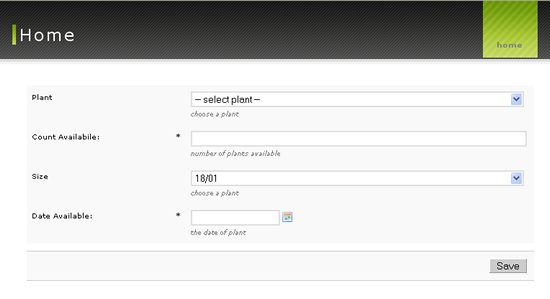
- Next, using the form, add an item, then press the Save button
- Your item will be saved and you will be taken to the Display Shipment screen:
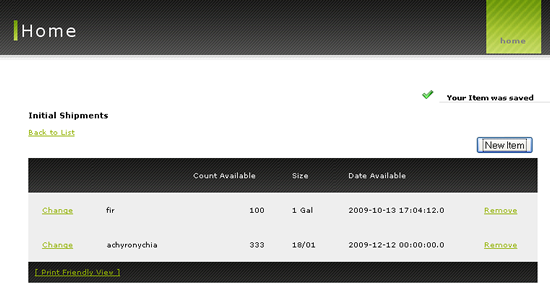
Attachments
-
training06-1.png
(52.9 kB) - added by cfgrok
16 years ago.
Training 06 Image 1
-
training06-2.png
(91.2 kB) - added by cfgrok
16 years ago.
Training 06 Image 2


