![(please configure the [header_logo] section in trac.ini)](/ModelGlue.com/trac.cgi/chrome/site/your_project_logo.png)
Section 7: Crossing the Generational Gap
In this next exercise, we'll be creating a searchable interface for our plants. If you've been paying attention, you know that for every user interaction we pretty much need some Model-Glue XML, a Controller, a Controller Method and a View. While all these pieces are important for consistency and for proper standardization, manually creating all of these pieces can add friction into the development process. Model-Glue 3 introduces Event Generation, an automated way of creating the boilerplate code for you.
Exercise: Event Generation
- First, let's visit a fictitious Event Handler:
We'll get an error telling us no event named "Plant.Search" is defined.
- Next, open /PlantOMatic/config/ColdSpring.xml and find the definition for modelglue.modelGlueConfiguration. Then Locate the setting for generationEnabled and change it from:
<property name="generationEnabled"><value>false</value></property>
To:
<property name="generationEnabled"><value>true</value></property>
Now, each time you request an undefined Model-Glue Event Handler, Model-Glue will generate Model-Glue XML definitions, Controller bodies and methods and views. This is a powerful feature and should only be enabled when you wish to generate new code. Model-Glue does not distinguish typos from intent, so be careful''
- Simply refresh the page, and Model-Glue will generate a bunch of free code to support our new Plant.Search functionality
- Open /PlantOMatic/config/ColdSpring.xml and change the generationEnabled property back to false
Event Generation Results
Below is a list of the changes that happened by Model-Glue Event Generation. Take a moment to examine these files to better understand what was generated for you. After you finish, we'll need to clean up a few items to conform to our naming scheme.
New Files:
- /PlantOMatic/views/Plant/Search.cfm
Changed Files:
- /PlantOMatic/config/ModelGlue.xml
- New Event Handler: Plant.Search
- /PlantOMatic/controller/PlantController.cfc
- New Method: Search()
- Note: if PlantController did not already exist, Model-Glue would have created it for us
Event Generation Clean Up
- Delete These Files
- /PlantOMatic/views/Plant (the whole directory)
- Update The Model-Glue XML Event Handler for Plant.Search
<event-handler name="Plant.Search" type="templatedPage">
  <broadcasts>
    <message name="needPlantSearch" />
  </broadcasts>
  <views>
    <include name="Primary" template="SearchResults.Plant.cfm">
      <value name="xe_PlantSearchForm" value="Plant.Search" />
    </include>
    <include name="Secondary" template="SearchForm.Plant.cfm">
      <value name="xe_HandleSubmitForm" value="Plant.Search" />
    </include>
  </views>
</event-handler>
- Update the Search method in /PlantOMatic/controller/PlantController.cfc
<cffunction name="search" output="false" access="public" returntype="void" hint="I search plants">
  <cfargument name="event" type="any" />
  <cfset var SearchFilter = arguments.event.makeEventBean( "PlantOMatic.model.PlantFilter", "CommonName,Family,ScientificName,Symbol" ) />
  <cfset arguments.event.setValue( "PlantList", beans.plantManager.search( SearchFilter ) ) />
  <cfset arguments.event.setValue( "PlantFilter", SearchFilter ) />
</cffunction>
- Open /PlantOMatic/views/SearchForm.Plant.cfm and prepend the following:
<cfsilent>
  <cfimport prefix="uform" taglib="/PlantOMatic/uniform" />
  <cfset event.copyToScope( variables, "CFUniformConfig,PlantFilter,xe_HandleSubmitForm" ) />
  <cfset handleSubmitForm = event.linkto( xe_HandleSubmitForm ) />
  <cfset bean = PlantFilter />
</cfsilent>
- Open /PlantOMatic/views/SearchResults.Plant.cfm and prepend the following:
<cfsilent>
  <cfset event.copyToScope( variables, "PlantList,xe_doPlantSearchForm,xe_PlantSearchForm" ) />
  <cfset linkSearchForm = event.linkTo( xe_PlantSearchForm ) />
</cfsilent>
Putting It All Together
Refresh the Plant.Search event and take a look at your handiwork. We've used the fancy Model-Glue Event Generation to jump start our development process. Your screen should look like the figure below:
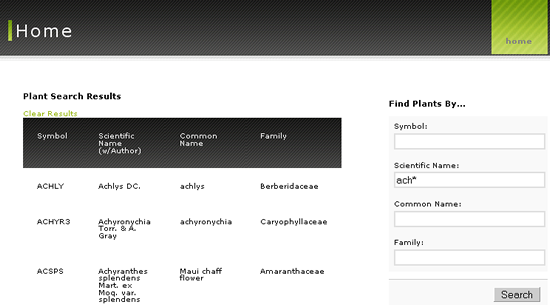
Plant Search Results
- This functionality uses several good object oriented techniques. Take a look at the source code for both views and notice how little business logic there is.
- Review the Search method of the PlantController also to see which portions of processing belong inside the view.
- Lastly, examine how the the /PlantOMatic/model/PlantFilter.cfc works with the /PlantOMatic/model/PlantManager.cfc to compartmentalize the business logic. Proper Encapsulation Leads To Maintainable Software!
- For extra points, try using a few characters with a trailing asterisk (as shown above) in the Scientific Name Text Input in the search form. Then trace how this functionality works.
Attachments
-
training07-1.png
(83.4 kB) - added by cfgrok
16 years ago.
Training 07 Image 1

