![(please configure the [header_logo] section in trac.ini)](/ModelGlue.com/trac.cgi/chrome/site/your_project_logo.png)
| Version 1 (modified by cfgrok, 16 years ago) |
|---|
Section 5: Mother's Little Helper
Part of a quality design is in not repeating the prescription of algorithms. Sure we can encapsulate our algorithm in a User Defined Function (UDF), but in a Model-Glue world, where do UDFs go?
Model-Glue 3 introduces the concept of helpers. Helpers are libraries of user defined functions. By placing these files in the proper location, Model-Glue 3 will automatically load them and make them accessible via the new helpers scope, available to both controller and view files. Let's implement a helper in our application.
- Open /PlantOMatic/config/ColdSpring.xml, find the definition for modelglue.modelGlueConfiguration and ensure you have a helper mapping pointing to /PlantOMatic/helpers:
<property name="helperMappings"><value>/PlantOMatic/helpers</value></property>
- Create a new file called date.cfm inside /PlantOMatic/helpers
- Place the following function inside /PlantOMatic/helpers/date.cfm
<cfscript>
/*
* Calculates the number of business days between 2 dates.
* @param date1 First date. (Required)
* @param date2 Second date. (Required)
* @return Returns a number.
* @author Harry Goldman (harry@icn.net)
* @version 1, April 10, 2008
*/

function businessDaysBetween( date1, date2 ) {
    var numberOfDays = 0;

    while ( date1 LT date2 ) {
        date1 = dateAdd( "d", 1, date1 );
        if ( dayOfWeek( date1 ) GTE 2 AND dayOfWeek( date1 ) LTE 6 )
            numberOfDays = incrementValue( numberOfDays );
    }
    return numberOfDays;
}
</cfscript>
- Open the file /PlantOMatic/views/List.Shipment.cfm and change the following line:
<td>#dateFormat( CreateDate, "short" )#</td>
To call our new UDF from the helpers scope:
<td>#dateFormat( CreateDate, "short" )# #helpers.date.businessDaysBetween( CreateDate, now() )# (Business days ago)</td>
- Now, click the Home navigation element again to run the Saved Shipments screen and see the new helper in action:
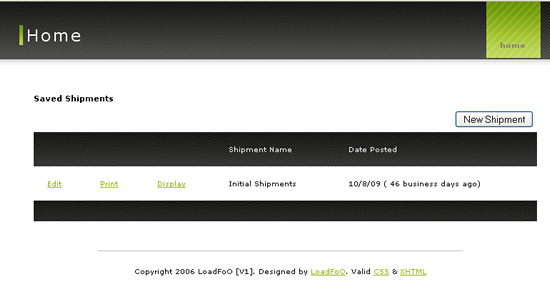
Date displayed with helper function
Helpers are a helpful (editors note: remove lame pun) way to organize your User Defined Functions and share them across views and controllers. For more information on Model-Glue Helpers, visit the following documentation:
Attachments
-
training05-1.png
(88.3 kB) - added by cfgrok
16 years ago.
Training 05 Image 1

